Automatic Differentiation#
Warning
Before running any code, ensure you are logged in to the Afnio backend (afnio login).. See Logging in to Afnio Backend for details.
When training AI agents and workflows, the most commonly used optimization algorithm is back propagation, where parameters such as prompts—or even specific sections of a prompt—are adjusted based on the gradient of the loss function with respect to the given parameter.
In Afnio, a gradient is not just a numeric value—it is semantic feedback: a meaningful suggestion, correction, or improvement for a prompt or template. Gradients in Afnio represent how your agent’s language or logic should be updated to better achieve the desired outcome, based on feedback from evaluators, users, or other modules.
To compute those gradients, Afnio has a built-in differentiation engine
called afnio.autodiff. It supports automatic computation of gradient for any computational graph.
Variables, Functions, and the Computational Graph#
Afnio builds a computational graph from your operations on Variables. Each Variable can represent a prompt (or part of a prompt), input, or output in your workflow. When you perform operations (such as addition, splitting, or calling a language model), Afnio tracks these steps and enables gradients to flow back through the graph.
Consider a simple retrieval-augmented agent, with three context inputs (c1, c2, and c3), a user query (user_query), two learnable prompts (system_prompt and user_prompt), and a ground truth answer (ground_truth) for evaluation with some loss. It can be defined in Afnio as follows:
Example: Defining a retrieval-augmented agent and building the computational graph
os.environ["OPENAI_API_KEY"] = "sk-..."
Before running the following code, make sure you have set your OpenAI API key in your environment.
import os

os.environ["OPENAI_API_KEY"] = "sk-..."  # Replace with your actual key
import afnio.cognitive.functional as F
from afnio import Variable
from afnio.models.openai import AsyncOpenAI

# Context Variables and user query (not optimized)
c1 = Variable(
    "Customer preferences: likes modern design, hates clutter.", role="context"
)
c2 = Variable(
    "Product info: the AURA lamp has 3 brightness levels and charges via USB type C.",
    role="context",
)
c3 = Variable(
    "Customer chat history: user asked about ambient lighting last time.",
    role="context",
)
user_query = Variable(
    "\n\nWhat type of charging port does the AURA lamp use?", role="user query"
)

# Learnable Variables
system_prompt = Variable(
    "You are an expert e-commerce assistant.",
    role="system prompt",
    requires_grad=True,
)
user_prompt = Variable(
    "\n\nAnswer the user's query with a single word.\n\nUser Query: {query}",
    role="user prompt",
    requires_grad=True,
)

# Compose user message and run LM using utility function
def forward_pass():
    user_message = F.sum([c1, c2, c3]) + user_prompt
    messages = [
        {"role": "system", "content": [system_prompt]},
        {"role": "user", "content": [user_message]},
    ]
    response = F.chat_completion(
        AsyncOpenAI(), messages, inputs={"query": user_query}, model="gpt-4.1-nano"
    )
    return response, user_message

response, user_message = forward_pass()

# Evaluate output against ground truth (score, explanation can be used as a loss)
ground_truth = Variable("USB-C", role="ground truth")
score, explanation = F.exact_match_evaluator(response, ground_truth)
This code defines the following computational graph:
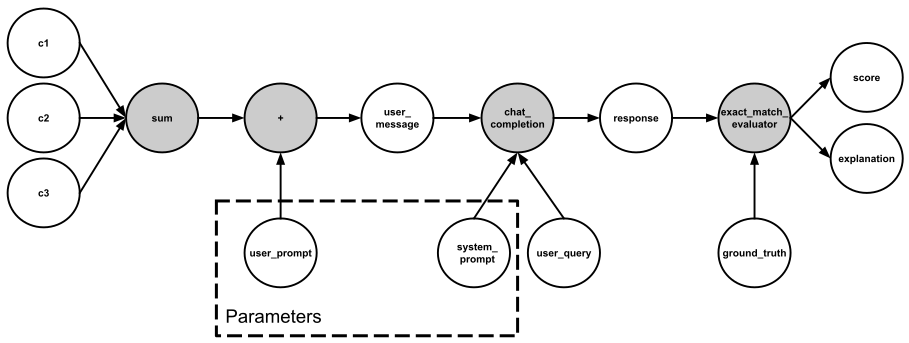
In this agent, system_prompt and user_prompt are parameters that should be optimized. To enable gradient-based optimization, we need to compute the gradients of the loss function with respect to these variables. This is accomplished by setting the requires_grad property on each variable.
Note
You can set the value of requires_grad when creating a variabel, or later by using x.requires_grad_(True) method.
Any function applied to Variables to build the computational graph is represented by an instance of the Function class. This object defines both how to compute the function in the forward pass and how to compute its gradients during backward propagation. The reference to the backward propagation function is stored in the grad_fn attribute of each Variable.
print(f"Gradient function for user_message: {user_message.grad_fn}")
print(f"Gradient function for response: {response.grad_fn}")
print(f"Gradient function for explanation: {explanation.grad_fn}")
Output:
Gradient function for user_message: <AddBackward object at 0x7ac0d2383c70>
Gradient function for response: <ChatCompletionBackward object at 0x7ac0d2383ee0>
Gradient function for explanation: <ExactMatchEvaluatorBackward object at 0x7ac0d2383c40>
Computing Gradients#
To optimize your agent’s parameters (system_prompt and user_prompt), you need to compute the gradients of your loss function with respect to those Variables. In Afnio, a “gradient” is semantic feedback—such as a suggestion, correction, or improvement—rather than just a numeric value. Gradients are computed by calling explanation.backward(), which propagates feedback through the computational graph. You can then access the results in system_prompt.grad and user_prompt.grad.
Afnio uses language models to generate semantic feedback during backpropagation. Before calling backward(), you must specify which model to use for generating these gradients by calling set_backward_model_client. This function sets the backend model (such as OpenAI GPT-4.1) that will interpret the explanation and produce meaningful updates for your Variables.
In Afnio, the backward graph for optimization is built remotely on the Afnio backend, which is hosted on Tellurio Studio. To perform backpropagation and enable gradient computation, you must run it within a Run context manager. For more details, see Runs and Experiments.
Example: Creating an optimization Run and computing gradients
import afnio

afnio.set_backward_model_client(
    "openai/gpt-4.1",
    completion_args={"temperature": 0, "max_completion_tokens": 32000},
)

with te.init("username", "my-project"):  # replace "username" with your Tellurio Studio username (slug format)
    explanation.backward()

    print(system_prompt.grad)
    print(user_prompt.grad)
Output:
[Variable(data=The system prompt establishes expertise but does not reinforce the need for precision or exactness in responses. To improve exact match performance, clarify that answers must use the precise terminology as found in the product information, including specific suffixes or variants (e.g., 'USB-C' instead of 'USB')., role=feedback to system prompt, requires_grad=False)]
[Variable(data=Here is the combined feedback we got for this specific user prompt and other variables: The user prompt instructs to answer with a single word but does not specify that the word must match the product information exactly. Strengthen the instruction by stating that the answer should be the exact term as described in the product details, including any suffixes or variants (e.g., 'USB-C')., role=feedback to user prompt, requires_grad=False)]
Note
We run backward() on explanation rather than score because the score is a numeric value (such as accuracy or similarity) and does not contain actionable feedback for prompt improvement. The explanation, however, is a structured, language-based suggestion or critique that can be interpreted by a language model to generate semantic gradients. Running backward() on the explanation ensures that the feedback is meaningful and relevant for updating prompts or logic in your agent.
Note
We can only obtain the
gradproperties for the leaf nodes of the computational graph, which haverequires_gradproperty set toTrue. For all other nodes in our graph, gradients will not be available.By default, you can only call
backward()once per computational graph for performance reasons. If you need to perform multiple backward passes on the same graph (such as for multi-task training), useretain_graph=Truein yourbackward()call.
Resetting Gradients#
After accumulating gradients from multiple metrics or tasks, you may want to reset the .grad attribute before starting a new round of evaluation or optimization. This prevents outdated feedback from affecting future updates.
Example: Clearing accumulated gradients before a new optimization round
# Clear accumulated gradients for a Variable
system_prompt.grad.clear()
user_prompt.grad.clear()
print(system_prompt.grad)
print(user_prompt.grad)
Output:
[]
[]
In real training workflows, this step is typically handled by the optimizer, which resets gradients automatically at each optimization step. See Optimization Loop for more details.
Gradient Accumulation#
When optimizing agents, you may want to aggregate feedback from multiple metrics or tasks before updating your prompts or parameters. In Afnio, gradients are accumulated in the .grad attribute of each Variable. This means that if you call .backward() multiple times on different explanations (or feedbacks), the resulting gradients will be collected together.
Gradient accumulation is especially useful when you have several evaluation metrics (such as accuracy, relevance, and clarity), or when you are training on multiple tasks and want to combine their feedback before updating your agent.
Example: Accumulating gradients from multiple evaluation metrics
with te.init("username", "my-project"):  # replace "username" with your Tellurio Studio username (slug format)
    # Re-run forward pass to build new computational graph
    response, _ = forward_pass()

    # Metric 1: Exact match evaluator
    score1, explanation1 = F.exact_match_evaluator(response, ground_truth)

    # Metric 2: LM judge for ambiguity
    judge_task = Variable(
        "You are an evaluation assistant. Assess if the prediction respects the "
        "specified criteria compared to the target. Return a JSON object with two "
        "fields: 'score' (TRUE if the prediction fully respects the criteria, "
        "otherwise FALSE) and 'explanation' (a brief justification).",
        role="evaluation task",
    )
    criteria = Variable(data="unambiguous", role="english text")
    judge_instruction = Variable(
        data="<CRITERIA>{criteria}</CRITERIA>\n<PREDICTION>{prediction}</PREDICTION>\n<TARGET>{target}</TARGET>",
        role="judge instruction",
    )
    messages = [
        {"role": "system", "content": [judge_task]},
        {"role": "user", "content": [judge_instruction]},
    ]
    score2, explanation2 = F.lm_judge_evaluator(
        AsyncOpenAI(),
        messages,
        response,
        ground_truth,
        inputs={"criteria": criteria},
        model="gpt-4.1",
        temperature=0,
    )

    # Accumulate gradients from all explanations
    explanation1.backward(retain_graph=True)
    print("Gradients after first backward (exact match):")
    for idx, grad in enumerate(system_prompt.grad):
        print(f"[{idx}] {grad!r}")

    explanation2.backward()
    print("\n\nGradients after second backward (exact match + LM judge):")
    for idx, grad in enumerate(system_prompt.grad):
        print(f"[{idx}] {grad!r}")
Output:
Gradients after first backward (exact match):
[0] Variable(data=The system prompt establishes expertise but does not reinforce the need for precise, exact answers. To better align with the 'exact match' evaluation, clarify that responses must use the exact terminology and formatting found in product specifications (e.g., 'USB-C' instead of 'USB')., role=feedback to system prompt, requires_grad=False)


Gradients after second backward (exact match + LM judge):
[0] Variable(data=The system prompt establishes expertise but does not reinforce the need for precise, exact answers. To better align with the 'exact match' evaluation, clarify that responses must use the exact terminology and formatting found in product specifications (e.g., 'USB-C' instead of 'USB')., role=feedback to system prompt, requires_grad=False)
[1] Variable(data=The system prompt establishes expertise but does not explicitly instruct the assistant to provide precise or unambiguous answers. To reduce ambiguity in responses, consider adding guidance to always specify exact product standards or types (e.g., 'USB-C' instead of 'USB')., role=feedback to system prompt, requires_grad=False)
Gradient accumulation enables flexible multi-metric and multi-task optimization, allowing your agent to learn from diverse sources of feedback.
Disabling Gradient Tracking#
By default, all Variables with requires_grad=True track their computation history and support gradient computation. However, you may want to disable gradient tracking in situations where you have already optimized your system and only need to perform inference on new input data. In these cases, only forward computations are required, and disabling gradients can improve efficiency.
Example: Disabling gradient tracking with afnio.no_grad() context manager
user_message = F.sum([c1, c2, c3]) + user_prompt
print(user_message.requires_grad)

with afnio.no_grad():
    user_message = F.sum([c1, c2, c3]) + user_prompt
print(user_message.requires_grad)
Output:
True
False
Example: Using detach() to create a Variable that does not track gradients
user_message = F.sum([c1, c2, c3]) + user_prompt
user_message_det = user_message.detach()
print(user_message_det.requires_grad)
False
Why disable gradients?
To freeze certain prompts (or parts of a prompt) or parameters during optimization.
To speed up computations when only the forward pass is needed.
More on the Computational Graph#
Conceptually, the Afnio afnio.autodiff engine records all Variables, the operations performed on them, and the resulting output Variables in a directed acyclic graph (DAG) of Function objects. In this DAG, leaves are the input Variables and roots are the outputs.
Forward Pass:
Each operation produces new Variables and attaches a gradient function (
grad_fn) to track how feedback should flow backward.The graph is built dynamically as you compose prompts, context, and agent logic.
Backward Pass:
When you call
.backward()on a root Variable (such as anexplanation), Afnio traverses the graph in reverse.Semantic gradients are computed by each
grad_fnand accumulated in the.gradattribute of each Variable.Feedback is propagated all the way to the leaf Variables using the chain rule, enabling meaningful updates to prompts or logic.
Note
Afnio’s computational graph is dynamic and rebuilt after each .backward() call. This flexibility allows you to use control flow statements, swap prompts, freeze parameters, or modify agent logic at every iteration, if needed. You can change the architecture, prompts, and operations in your agent at every step.